Android/iOS App – Case Study
Broker Free Listings to Find the perfect Accodomation and Roommates
“FindmeaRoof” is a mobile application that facilitates the process of finding rental accommodations by enabling users to search for rooms in already-occupied apartments and identify potential roommates for shared rental arrangements.

Year
2021
Company
Txlabs Formerly known as Jiniguru Pvt Ltd
Role
UX Research, Visual Design, Interaction Design, Project Management, End to end support
Team Members
Kinjal Thakkar
Overview
"Find Me a Roof" is a digital initiative aimed at streamlining the process of finding suitable roofing solutions. The project focuses on creating a user-friendly platform that aggregates roofing options, making it easier for users to compare and select the best fit for their needs. By leveraging technology, the platform seeks to bridge the gap between roofing service providers and potential customers, ensuring a seamless and efficient user experience.
Role
The primary role in this project involved conceptualizing and developing the digital platform. This encompassed designing the user interface, ensuring intuitive navigation, and integrating features that allow users to filter and compare roofing options based on various criteria. Additionally, the role extended to collaborating with roofing service providers to ensure a comprehensive and up-to-date database of offerings.
Challenge/Impact
One of the main challenges faced was the fragmentation of information in the roofing industry. Potential customers often had to sift through multiple sources to gather information, leading to a time-consuming and often confusing process. Furthermore, there was a lack of standardized data, making comparisons between different roofing options difficult. Ensuring the accuracy and reliability of the aggregated information also posed a significant challenge.
Solution
To address these challenges, the project implemented a centralized platform that aggregates roofing options from various providers. Advanced filtering and comparison tools were integrated to assist users in making informed decisions. The platform also established partnerships with roofing companies to ensure real-time updates and accurate information. By prioritizing user experience and data reliability, "Find Me a Roof" successfully streamlined the roofing selection process for users.
According to infographics provided by Urbanet
54%
Of the worlds total population lives in Cities/Urban communities.
Avg. Marriage Age
The average marriage age for men is 29(up from 26 two decades ago) and for women is 27(up from 23 in the same time period).
People in thier Twenties move to Tier 1-2 cities living with roommates mostly to pursue thier dream careers & Professions.
As work oppurtunities develop people swarm into cities, Which results in not getting a suitable Roommate, However there are many Platforms but most of them are flooded with adverts & Listings posted by Brokers & Builders.
Secondary/desk research
Before starting the user research, We did some desk research to collect data and insights that helped us in understanding the problem space better and also to get some baseline information in understanding the overall market structure, the industry situation, past consumer trends and behaviors, and to support & validate insights from primary research.
Research by Deloitte - 426 Million
Millenial Population in India is around 34% and 47% of the Workforce comprises of them. Millenials are the chief bread earner in most Indian households.
Financial Stress - 22 Years & older
College Students & working people prefer living in Shared households to offset Financial Burdens
Companionship bring complex social dynamics.
Some people choose to live with roommates for companionship. There are a few products on the market trying to ease the pains of sharing a home, but nothing has a complete solution.
User Interviews
We interviewed 6 users, 4 interviews were done on Google Meet and 2 interviews were done on call. Prepared a set of questions that I came up with after going around the problem statement a couple of times and doing a short brain-writing session.
Defining user needs - Addressing user needs, pain points & assumptions
Pain points
Platforms full of broker listings that charge absurd amount of brokerage.
Fake listings with fake pictures and information, & No way to identify real Profiles & Listings
Sharing contact number and address details on platforms without any security.
Annoying, ill-mannered roommates that cannot be changed if regularly faced issues.
Scarcity of appropriate platforms to look for roommates/flatmates
Needs
Find an ideal accommodation
Find an ideal roommate/flatmate
Privacy protected
Cut down costs of living
Assumptions
Users need a way to explore potential roommates’ interests, habits, and personality traits
Users want personalized recommendations
Primary user research/ User Group
After gathering our initial research, We had a pretty solid idea of our target market and potential users. But we needed some more first-hand insights to make sure we come up with the right solution. So, we went ahead with user interviews to empathize with the users and understand their needs and wants. For this project, we focused on 2 user groups:
People looking for accommodations.
People looking for roommates/flatmates
Ideating solutions User flow
Before ideating solutions, I created a basic user flow for the product to have a visual representation of the path the user can follow to achieve the goal.

Brand identity
Through the logo, we wanted to highlight the importance of living spaces and a way to showcase the Importance of a roof for someone living in an unknown city. The logo therefore contains a house which is also a common part of many brand logos that we looked at in the competitive analysis and a Magnifying glass signifies the details we usually look into when searching for a place to live.
Coming to the color scheme, the product needed to be lively & inviting to make the experience more joyful. The font needed to be easy to read on all devices, at all different sizes, including small caption text and large headers or titles.
Logo, Typeface & Color scheme

Satoshi Typeface


Splash Screen & Onboarding


Sign Up Flow
As onboarding is the first point of contact the user has with the product, I decided not to keep the onboarding process long and only asked the user to enter essential details.
Why mobile number sign up ?
According to popular email marketing service MailChimp, of all ecommerce emails sent 16.7% are opened, but the click rate is only 2.36%.
SMS marketing, on the other hand, is more efficient as 99% of text messages from brands are opened and the click rate is nearly 20%. While emails tend to get lost in a crowded inbox, the chat-loving South Asians rarely miss an instant message.
Phone numbers are more convenient than emails. Over 85% of adults own a mobile device, whereas many don’t own a computer.
Notifications sent via SMS are more likely to be read by the user rather than the ones being sent by an email. This is because people don’t check their mails as frequently as they check their texts.
User isn’t also asked to enter the room or roommate requirements during sign up because I felt like these options could be looked into on the home page. Also because users may have preconceived notions that’d prevent them from being open to exploring all options.

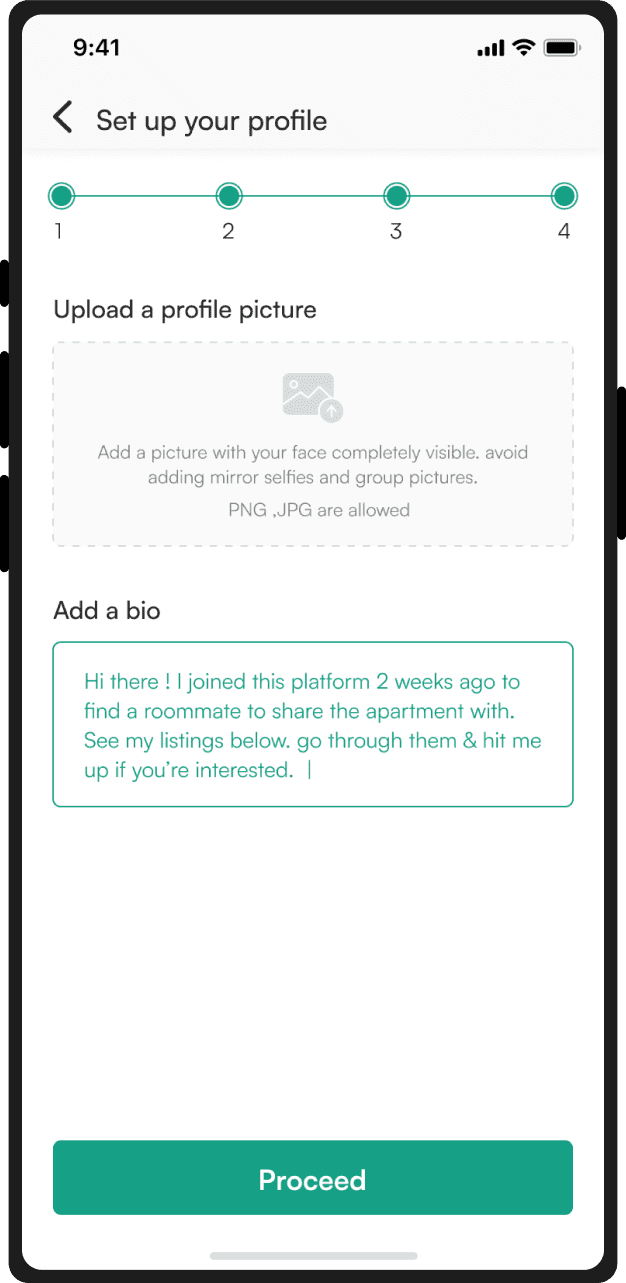
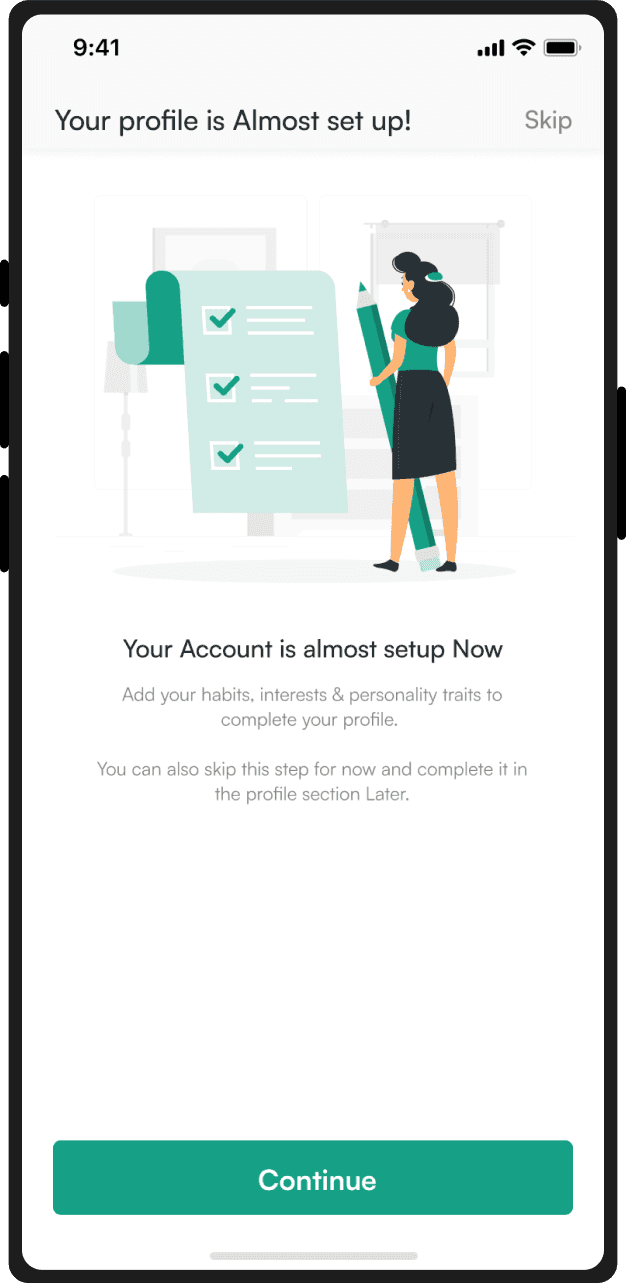


Verify Identity to reduce fake/anonymous profiles & educating Banner to help users about the benefits of verifying their identity. Add profile picture and a bio, & Comfirmation screen
Explore Rooms

After signing up, the “Explore” page opens up. The top navigation bar displays the current location, notification section and a toggle to switch depending on what the user is looking for, a room or a roommate.
A banner asks the user if they want room/roommate recommendations displayed on the explore page. Tapping this banner takes the user to the process of creating a listing/ad as someone looking for a room or roommate.
After creating and posting their listing, recommended rooms/roommates are displayed on the “Explore” page. This way, the users can go through recommended listings that match their requirements and can also be contacted via potential roommates/ room listers who saw their listing.
Featured listings from the nearby areas are displayed so that the user can explore without putting in any requirements. From user research, I got to know that along with their preferred localities, users also search for accommodations in nearby localities in hopes of getting a better accommodation there.
The “Localities near you” section displays rooms in nearby localities that the users can explore and see if they can find a room that suits their needs better.
Explore Roommates


Search results and filters
Add locations to view more results
Room listings displayed
Add filters according to requirements
Tab FAB to switch to map view
Room locations displayed on the map
Room listings in carousal view
Swipe up to browse in list view
filters
Search results are displayed in a list view by default, amount of search results is also displayed to the user.
Users can tap the Floating Action Button “Map” to switch to the map view and explore rooms.
Search results can be narrowed down according to user requirements by using filters.
Sorting preferences are also present in the filters section, users can sort the results as per their convenience.
Users can also search for rooms in multiple locations at once by tapping “Add location” and entering more locations.


Designed the listings in such a way that the users can get all the vital information about the room/profile without tapping and going into the details page.
This way, the users can make a decision and move onto the next listing quickly if the previous listing doesn’t interest them.
The current listing design is a result of 4 iterations that I have depicted in the picture above.
Users can also save the listings to “favorites” by tapping the heart icon on the top right.

The details section contains all the info about the room, room lister/flatmate, amenities, compatibility and the locality.
Keeping privacy issues in mind, the complete address and contact number of the room lister is not displayed, it is only available after the chat request is accepted.
User can go through the entire listing and send a chat request to connect to the lister.
Having lot of information also increases the length of the page which ultimately results in more scrolling. To save the users from the hassle of scrolling, I designed a horizontal section layout which will assist users in switching and viewing different information section in the listing easily.
The roommate/flatmate listing is designed similarly like the room listing containing room requirements, compatibility info and desired amenities.
Favorites

Messages
Designed for both, empty and full states.
Empty state CTA redirects user to the “Explore” page so that they can finalize a room/roommate and send a chat request to start a conversation.
Users can toggle between active, inactive and pending messages from the drop down menu in the top right. Message requests are found in the “pending” list.
After the approval of chat request, users can also send a call request.
Banner educating users to not give out any private info for their safety.
Message templates are also provided for quick conversation and to assist the users.
Users can also attach images, videos and location in the chat.


Creating a listing for Room`


Creating a listing for Room-mate


The process of creating a listing takes the user through a number of steps, the process is divided into steps to make it less overwhelming for the user.
A progress bar is also displayed to indicate how far the user has come and to encourage them to finish the process.
Each step requires filling details like room info, amenities, location and compatibility info.

Profile
Users can edit and view their profile to make any changes or to update something.
Keeping in mind that any confusions or issues in the product will lead the users straight to the profile section, I designed a simple and easy to navigate profile section.
Options like help & support are displayed upfront so that users can contact the customer care team instantly in case of any issues or queries.

Learnings from the project
Learned how to work within a defined time constraint of 4–5 days and make trade-offs in the design process.
As someone who’s been through the hassle of house hunting multiple times, I got to learn about the struggles of other people too. The user interviews were full of insights and I was able to compare my process of house hunting with others, pointing out the similarities and differences.
Competitive analysis helps in identifying the gaps in existing platforms in the market so that the solution you’re working on tries to covers all the gaps.
Desk research gives the “Who, what, where and when” data whereas primary user research gives the “How and why” behind every decision taken by the user.
As designers, we often assume user behavior with the product and its usage. This may occasionally lead us in the right direction, but the effectiveness of these decisions can’t match the level of decisions taken on the basis of real, actual data.
Retrospection and further additions
A bunch of things that I would've done differently or rather added to improve the UX, if time was not a constraint
Testing the prototype with the users to observe their interactions with the product and figure out improvements in the user flows.
Adding a feature to buy/rent furniture or a marketplace, where people moving out can post their furniture for sale and people in need can buy. Therefore promoting another direct connection between users (buyers and sellers), keeping middlemen out of the process.
Adding a feature to call packing & moving services to assist users when they’re shifting from one place to another.