Android App – Case Study
Proposing an improved experience of Collecting Books the right way
The primary purpose of these online libraries is to disseminate books & knowledge for free or close to free, to achieve information & provide a community space for readers to interact around, but in the digital era of home delivery, people who like learning can face many problems. With CodaRed we propose an improved solution for Buying, Reading & Renting Books.

Year
2019
Company
Txlabs Formerly known as Jiniguru Pvt Ltd
Role
Ux Lead, Team Lead
Team Members
Shubham Chakraborty, Tushar Patil, Devendra Vithalpara
Overview
"Coda Red" is a mobile application designed to enhance the e-reading experience for users. The project focuses on providing an intuitive and engaging platform for book enthusiasts, aiming to make digital reading more accessible and enjoyable. By leveraging modern design principles and user-centric features, "Coda Red" seeks to bridge the gap between traditional reading and digital convenience.
Role
In this project, Dhruvin Dave played a pivotal role in conceptualizing and developing the "Coda Red" application. His responsibilities encompassed designing the user interface, ensuring seamless navigation, and integrating features that cater to the needs of avid readers. Additionally, he collaborated with a team of developers and designers to bring the vision of an improved e-reading experience to fruition.
Challenge/Impact
The implementation of "Coda Red" has significantly improved the digital reading landscape for its users. By offering a user-friendly interface and features tailored to readers' preferences, the application has enhanced user engagement and satisfaction. The project's success is evident in its adoption by a growing community of readers seeking a superior e-reading experience.
Solution
To address the challenges associated with digital reading, the "Coda Red" project introduced a mobile application that combines intuitive design with functionality. Features such as customizable reading settings, bookmarking, and a curated library were integrated to meet users' needs. By focusing on user experience and leveraging modern technology, "Coda Red" offers a compelling solution for readers in the digital age.

Online Survey
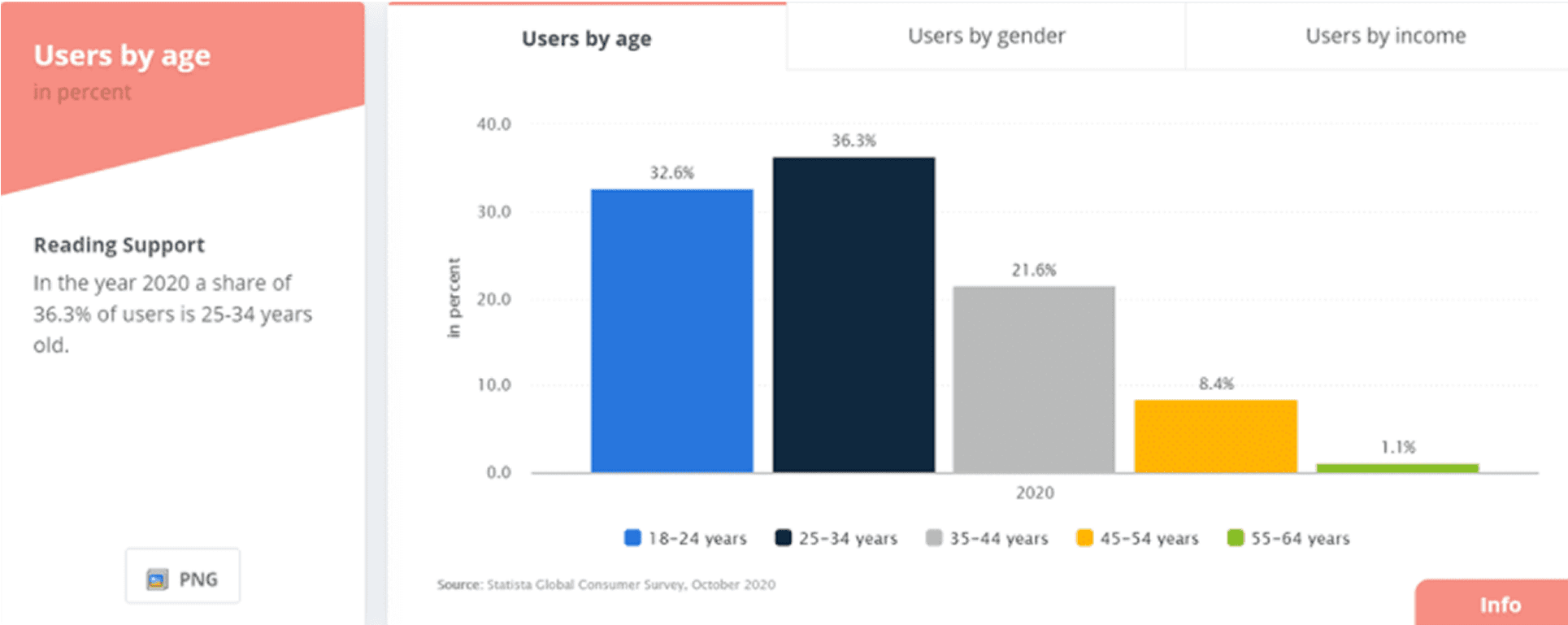
We surveyed 50 people on Online Facebook groups & Reddit with the most active group of readers, who also happen to face some problems which included the age group of 18-50 years roughly. The questionnaire consisted of a mixture of open-ended and close-ended questions, asking users about the experience they have with reading books and the problems they face in the reality or their opinions and what they try or use to solve the current problems. At the end of the survey, we also asked them what did they love most about the physical books, and the answers were very same, yet very different too! Below are the survey questions that were asked to the active readers & the insights that we got.












Competitive Analysis
Through the survey, we found out there were a lot of reading-related apps & websites people were using for reading/downloading e-books or buying second-hand books. These are the top 5 apps that we will be comparing

Empathy Map


Snippets of the early Ideation Phase

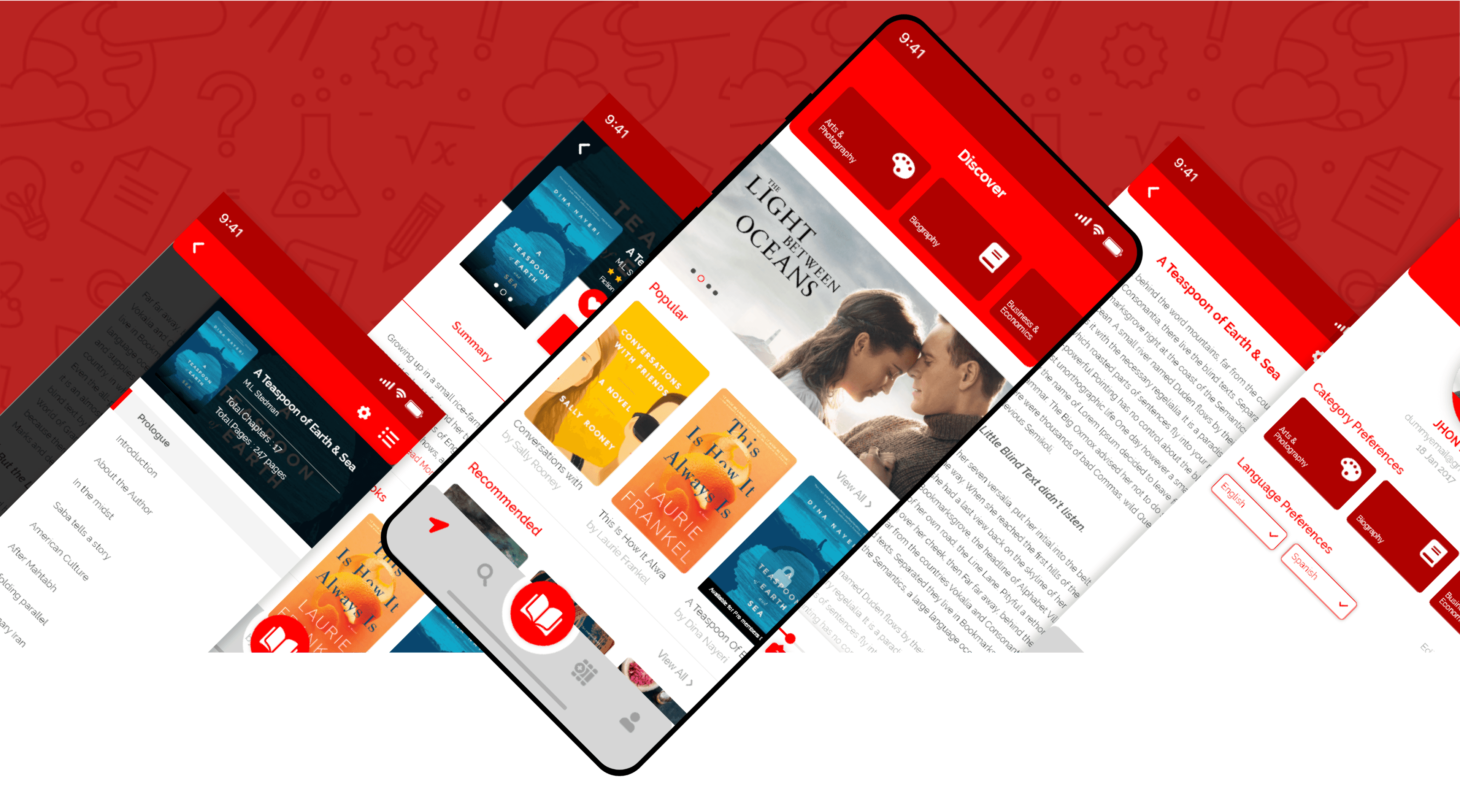
Welcome to CodaRed
After getting into the app for the first time, Since the user does not have an account yet, they can signup with any of the popular social media accounts for quick access or use his email id to get started
Splash Screen
Showing categories visually first thing increases chances of a user browse more categories then the ones they are actually interested.
Sign-Up Screen
Just the important information for a user to quickly get into the app & start reading.
Sign-In Screen
User can Signup or signIn manually or using the most common social media platforms or simply skip & browse if they are unsure, which adds to the trust factor & privacy of the user


Easy Onboarding
Onboarding is one of the essential phases of a mobile app user’s journey. Think of onboarding as meeting someone new. In the province of mobile app development, it is the first point of contact with your target audience where you are expected to establish a solid impression.
Effective app onboarding is a key element in the success of the mobile app and you should pay attention to it. The word of mouth publicity or good customer reviews are byproducts of good app onboarding where users realize the value of your mobile app and spread a good word about it
Onboarding Screens
Allowing customers to immediately realize to product’s value and how it can improve their lives is a direct path to success and Guide users through the app with interactive features.
Target area for the skip button was selected to decrease visibility, as it may be a boring but important feature for users, to help them get familiar with our app initially.
Customize your shelf
A reasonable navigation system and a stable path to the task provide users to rapidly achieve their goals and develop a fluid user experience. Shelves support a user to efficiently handle the books they prefer & categorize them based on their want.
My Shelf
The simplification of the user journey has a direct effect on the user’s viscosity and conversion rate of the product. hence the bottom nav bar.
Customize Shelf
Based on your liking either create multiple collections for the books or scan ISBN id etc to categorize them. Also, you can name them anything you want, or based on the category of your first book, the name will be automatically given


Enjoy your Liking
Just after the onboarding process, the user can determine their choices for the kind of content they are hoping to have on their feed by choosing the relevant Categories - Languages and Age groups. or skip this & browse giving the user a feeling of authority, allowing them to be in control instead of making them attend the whole process.
Wide Range of Categories
Wide range of categories & a wider range of sub categories to choose from initially or later as per the user chooses
User Preferences
During our research we found age is a defining factor when it comes to understanding what they might like, for eg. age group above 45 are more specific of their reading habits & categories they are interested in
Empty States
empty states can be used to guide the user, offering a potentially great opportunity to help the user get started quickly, thereby reducing the chance for abandonment. Not making the user think twice by the use of an empty screen & the use of overlapping buttons to draw users attention
Reading Mode
So after a broad analysis we identified and worked out issues individuals had with the existing reading apps, Easy highlight and view later option for just the highlighted part with the subject title, copy option, Type size changes, Brightness, Clear navigation between chapters, and the settings that protect your eyes when you are reading for a long time. It keeps your eyes miles away from strain even when you read for hours.
Source: https://www.pnas.org/content/112/4/1232
Customizable Settings
Locks the brightness and orientation to your preferred setting so that your screen does not keep bugging you while you read.
Puts down Ring/Notification volume so that notifications do not disturb you while you read.
All these settings are user configurable to their best comfort.
Easy To refer back later Features
Chapters in books for easy navigation & highlight option for people who like noting things while they ready, saving the highlighted part separately for easy access later.


Sleep deficiency has been shown to increase the risk of cardiovascular disease, metabolic diseases like obesity and diabetes, and cancer. "Thus, the melatonin suppression that we saw in this study among participants when they were reading from the light-emitting e-reader concerns us.
-Charles Czeisler
Sumamry of the Research Article
To summarize the article; blue light is what causes you to have a bad nights sleep after using a LED device (including ereaders). So, in order to reduce the blue light, you need to get rid of the bright colours. Programs for your computer, and night mode for your tablet do this effectively. Of course, this isn't a 100% solution, but it does help.
Source: https://www.pnas.org/content/112/4/1232



ISBN Scanner
An ISBN Scanner is More Accurate & Faster Than Typing & it Boosts User Engagement The primary reason to build ISBN scanning in your mobile app is that it disposes of typing from your in-app processes. Human brains aren’t built for typing out long lists of irrelevant letters and numbers; it’s laborious, time-consuming, and often leads to frustrating errors. It’s therefore easy to perceive why mobile ISBN scanning is the better choice.
Source - https://anyline.com/news/isbn-scanner-app/
How can ISBN Scanner be useful
Scenario 1: Imagine you find a book you like, simply scan ISBN code & rent on the app.
Scenario 2 : Imagine you are at a library or a friends house & want to save multiple books for later, batch scan multiple books
Scenario 3 : Search & save books for later instead
Scan & Search
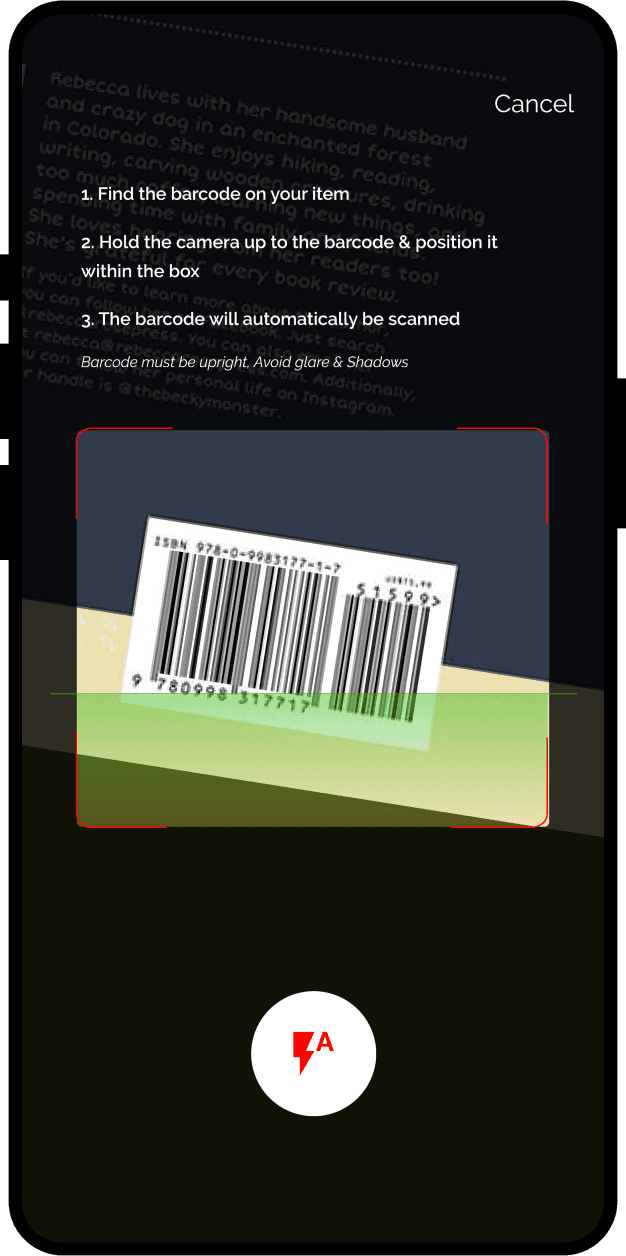
Simple scan screen with clear instructions to not make the user think even what would happen after the click or how scanning works. Flash feature for darker regions.
Scan History
After you scan ISBN number a list is generated that saves all your scanned history & each number is a link that let you to the book itself

Results & Further Development
The Pitch for the MVP was indeed won & well received and the module was bought by the company along with a renewal of subscription in the form of maintenance & updates. Project Handoff was made between me and our Project Manager and the development team who would further develop the mobile prototype
Client Experience
In the meeting, I started by announcing the major problems and business requirements and presented the app in the form of a story by highlighting every time the main benefits of using the app, these are:
How each screen was carefully crafted by keeping the users in mind for maximum engagement.
Increased engagement with optimal UX and modern UI
Personalized experience and content based on user preferences.
Explained the Importance of ISBN Scanner & Reading mode in-depth with relevant case studies
Reward system & Community flow to be added in the Pro mode to increase engagement.
Lessons Learned
The main lesson I picked up from this practice was to prioritize and fixate on the main flows when you are offered time constraints So it pushed me to figure out to produce the flow based on the agenda. For me, this was special as I enjoy reading as well. Also, it was the first project I completed at the company, right out of the onboarding process. I had close to one working week to build the visual resources, optimize the UX based on the finest practices, and deliver and present the interactive prototype that was hailed with positive feedback.